Research-based guide: built from published manufacturer specifications and official standards documentation. We do not run hands-on lab tests, and we do not claim to.
Disclosure: Smart Home Tech HQ earns nothing from the links in this guide. There are no affiliate links here, and no brand paid for placement.
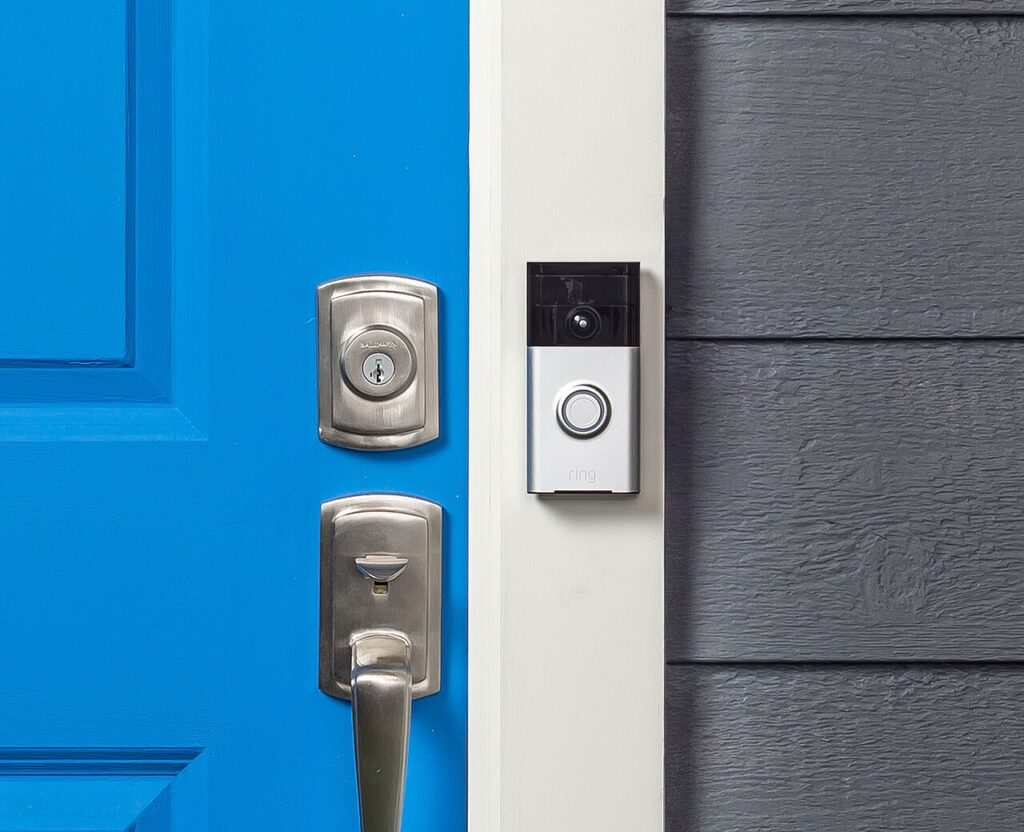
Photo via Wikimedia Commons
By Muhammad Haroon · Last Updated: November 8, 2026 · Originally Published: October 25, 2026
Why You Can Trust This Guide (Zero Affiliate Links, Zero Hype)
Most smart home review sites earn an affiliate commission when you click their links — which means recommending a $300 device pays them more than recommending a $15 fix. SmartHomeTechHQ is 100% free of affiliate links and sponsorships. We don’t claim fake lab tests or use pushy live-price widgets. Instead, we use rounded planning estimates ($40, $70, $150) and do the honest spec and trade-off homework for you — checking whether a device requires a hidden $50 hub, locks basic features behind a monthly subscription, demands house rewiring, or fails to pair on standard 2.4GHz/5GHz home Wi-Fi.
Quick answer
A video doorbell is a doorbell with a camera, microphone, and speaker built in. When someone rings or walks up, your phone shows a live video feed and lets you talk to them. For most beginners, a battery-powered doorbell is the easiest start: no wiring, installs in about 30 minutes, and costs roughly $60 to $100 for the device. If you already have doorbell wiring, a wired model never needs charging. The real long-term cost is not the device — it is the monthly subscription for saved video, so check the storage terms before you buy. Read the full Buying Guides section for more beginner-friendly picks.
Video doorbells compared
| Doorbell | Power | Video | Storage without a plan | Best for | Renter-Safe? |
|---|---|---|---|---|---|
| Ring Battery Doorbell | Rechargeable battery or wired | 1440p head-to-toe view | Live view only; recordings need a Ring Protect plan | Alexa households that want the biggest ecosystem | Yes — battery, no wiring |
| Blink Video Doorbell | 3 AA batteries or wired | 1080p (first generation) or 1440p (second generation) | Local clips with a Sync Module | Renters and set-and-forget battery life No Monthly Fee | Yes — battery, no wiring |
| Wyze Video Doorbell v2 | Wired only | 2K | microSD card (up to 256 GB, sold separately) | Lowest upfront cost if you have wiring No Monthly Fee | No — wired only |
| Google Nest Doorbell (battery) | Rechargeable battery | HD with intelligent alerts | 3 hours of event video history free | Google Home households | Yes — battery, no wiring |
| Arlo Video Doorbell (2nd gen) | Battery or wired | 2K HDR | Local storage via a base station on some models | Sharper video and wider smart-home support | Yes — battery option |
True 3-Year Cost: Hardware + Hub ($40–$69, only if a hub or chime is needed — a wireless chime costs $15–$30) + Subscription ($0–$360 over 3 years). Ring’s $9.99/mo plan costs about $360 over 3 years, and camera plans generally run $3–$20/mo. Picks marked No Monthly Fee record locally with no plan at all.
Device prices and specs below are drawn from published 2026 buying guides and retailer roundups, including a budget doorbell roundup and a Ring vs. Blink comparison. Prices change often — check the listing before you buy.
What $40, $70, and $150 actually buys
Around $40 (planning estimate): a wired-only 2K doorbell such as the Wyze Video Doorbell v2, listed at $39.94 in a 2026 budget roundup. You get sharp video and local microSD storage, but you must have existing doorbell wiring, and there is no battery option.
Around $70 (planning estimate): a battery doorbell such as the Blink Video Doorbell, listed at $69.99, with a 150-degree view and AA batteries that the maker rates for up to two years. You trade some resolution and app polish for very low maintenance.
Around $100 to $150 (planning estimate): the Ring Battery Doorbell at $99.99, with 1440p head-to-toe video, color night vision on newer models, and deep Alexa integration — plus a subscription if you want saved clips. Above this range you pay for 2K or 4K video, dual cameras that watch packages as well as faces, and wider fields of view.
First, answer three questions
1. Do you have doorbell wiring? Look for two thin low-voltage wires behind your current doorbell button, or a small transformer box near your breaker panel. If you have them, a wired doorbell is an option. If not, choose battery — and note that anything involving mains wiring should be handled by a licensed electrician.
2. Which voice assistant do you use? Ring and Blink work best with Alexa. Google Nest doorbells work best with Google Home. If your household is split, check each model’s compatibility page before buying — a wrong compatibility claim is the most common beginner mistake.
3. Do you want to pay monthly? Ring doorbells show live video free but need a Ring Protect plan (listed at $4 to $10 per month in comparisons) to save and replay clips. Blink offers local storage through its Sync Module, and its Basic plan is listed at $3 per month. Google Nest includes 3 hours of event history free, with Nest Aware at $8 per month for longer history. Over five years, a $5 monthly plan adds $300 — often more than the doorbell itself.
What you need
- The doorbell and its mount, screws, and wedge (in the box)
- A Phillips screwdriver and a drill for masonry or brick
- A phone running the doorbell’s app, on your home Wi-Fi
- A 2.4 GHz Wi-Fi network — most doorbells connect only on the 2.4 GHz band, so if your router merges 2.4 and 5 GHz under one name, you may need to temporarily use a dedicated 2.4 GHz network during setup
- For battery models: the included rechargeable pack or AA lithium batteries, plus a spare set
- For local storage: a Sync Module (Blink) or microSD card (Wyze and others), sold separately on some models
- Optional: an indoor chime or a compatible smart speaker for announcements
Setup steps
- Charge or insert batteries (5 minutes): charge the battery pack fully before mounting, or insert the AA batteries.
- Install the app and create an account (10 minutes): set up two-factor authentication on the account right away — this is a camera pointed at your front door.
- Connect to Wi-Fi (5 minutes): stand near your front door with your phone and follow the app’s pairing steps. A weak signal here causes most later problems.
- Mount the doorbell (15 to 30 minutes): mark the holes at about chest height (roughly 48 inches), drill if needed, and screw the mount in. Angle the wedge so the camera covers faces and the ground where packages land.
- Wire it, only if you have wiring (15 minutes, or hire an electrician): turn off the breaker first, not just the switch, then connect the two low-voltage wires.
- Set motion zones and notifications (10 minutes): draw a zone covering your porch and path, and exclude the street and sidewalk — this is the single biggest fix for notification spam.
- Test it (5 minutes): ring it, walk the path, and check the clip quality day and night before you consider the job done.
7 decision factors, with the cost impact of each
- Power type — $0 to $150: battery is free to install; adding wiring where none exists can cost $100 or more in electrician time (planning estimate).
- Video resolution — $0 to $60 more: 1080p is enough to recognize a face at the door; 2K helps read small details like a license plate from farther away.
- Field of view — $0 to $50 more: a 150-degree or head-to-toe view shows packages on the ground, not just faces. If porch piracy worries you, prioritize this over resolution.
- Storage — $0 to $120 per year: local storage costs nothing monthly but clips live on a card or hub at home; cloud plans cost $36 to $120 per year and keep clips if the device is stolen.
- Subscription features — $0 to $10 per month: package detection, person detection, and longer history are usually paywalled. Check exactly which features are free before buying.
- Ecosystem fit — $0: the wrong ecosystem costs nothing extra but quietly limits features, such as announcements on your speakers or automations with your lights.
- Weather rating — $0 to $30 more: look for an IP55 or IP65 rating for rain and dust resistance; a covered porch matters more than the rating number alone.
Best video doorbell without subscription fees
The cheapest doorbell to own is rarely the cheapest to buy. Ring’s $9.99/mo plan costs about $360 over 3 years — more than the doorbell itself — and without a plan, Ring and Nest doorbells drop to live view only, with no saved recordings. If you want a video doorbell without subscription fees, pick a model that records locally: Blink stores clips with a Sync Module, and Wyze records to a microSD card. Both are marked No Monthly Fee in the table above, and a local SD-card video doorbell keeps working even if you cancel every plan.
What happens to Ring and Nest doorbells without a subscription? You still get live view and motion alerts, but event history disappears — Nest keeps about 3 hours of event video free, and Ring keeps none. For apartment renters, a plug-in or battery video doorbell with a no-drill mount is the deposit-safe choice: no wiring, no holes, and you take it with you when you move. Battery models also work without existing doorbell wiring, which most apartments do not have.
Hidden costs to check. A wireless chime costs $15–$30 if you want to hear the bell inside, and 2K video looks sharper than 1080p in a hallway but uses more storage. Check the storage column before you buy — it decides what your doorbell actually does after day one.
Common mistakes
- Buying on sticker price alone: a $60 doorbell with a $10 monthly plan costs $660 over five years (planning estimate). Always add five years of subscription to the device price.
- Mounting too high: above head height, the camera films the tops of heads. Chest height is the sweet spot.
- Skipping motion zones: every passing car becomes a notification, and then you start ignoring the ones that matter.
- Weak Wi-Fi at the door: test your phone’s Wi-Fi at the door before buying. If it struggles, a mesh node or extender near the front of the house comes first.
- Forgetting the chime: battery doorbells do not ring your old mechanical chime unless wired to it. Check whether an indoor chime is included or sold separately.
- Ignoring the renter question: battery doorbells mount with two screws and leave tiny holes; wired models may need landlord permission.
Safety and privacy
Electrical safety: battery doorbells are safe to install yourself. Anything involving household wiring — connecting to a transformer or running new wires — should be done by or checked by a licensed electrician. Turn off the breaker before touching any wires.
Privacy: a doorbell camera records visitors, neighbors, and passersby, and audio recording is regulated in some US states. Point the camera at your own porch and path, not into a neighbor’s yard or windows. Tell household members and regular visitors that the doorbell records. Turn on two-factor authentication, review who has access to your account, and check the privacy settings for audio recording and clip sharing before the first week is over. For more on placement, see our guide to home security cameras.
Frequently asked questions
Do I need a subscription for a video doorbell?
Not always. Ring needs a plan for saved clips, though live view is free. Blink, Wyze, and some other brands record locally to a hub or microSD card with no monthly fee, with optional plans for extra features.
Will a video doorbell work without existing wiring?
Yes. Battery models mount with screws and run for months — Ring rates its battery at 6 to 12 months depending on activity and temperature, and Blink rates its AA batteries at up to two years.
Do video doorbells work with Alexa, Google Home, and Apple Home?
It depends on the model. Ring and Blink are Alexa-first. Google Nest doorbells are Google Home-first. Some models support Apple Home, but fewer do — always verify on the manufacturer’s compatibility page for the exact model, not the brand in general.
What happens if my Wi-Fi goes out?
Live view and phone alerts stop, since those need the internet. Locally stored clips on a hub or card keep recording on some models, and the doorbell still rings if wired to a chime. Cloud-only models cannot save clips during an outage.
Can a video doorbell see packages?
Only if the field of view reaches the ground. Look for a head-to-toe or 150-degree vertical view, or a dual-camera model with a dedicated package camera, and mount at chest height.
Is a video doorbell worth it for renters?
Usually yes. A battery doorbell installs with two screws, needs no wiring, and moves with you. Check your lease for anything about exterior cameras first, and keep the original doorbell button to reinstall when you leave.
Bottom line
Start with your wiring, your voice assistant, and your tolerance for a monthly fee — those three answers narrow the field to one or two models. For most beginners, a battery doorbell from Ring or Blink is the simplest first step; if you have wiring and hate subscriptions, a wired local-storage model saves the most over five years. Whichever you choose, set motion zones and two-factor authentication on day one. If you are just starting out, our beginner’s device guide and smart lighting guide cover the next steps. Questions about your own front door? Contact us and we will help you narrow it down.