Disclosure: This guide is research-based, not hands-on tested. We don’t sell products and we don’t run affiliate links — our guidance comes from manufacturer specifications, official documentation, and published expert reviews.
By Smart Home Tech HQ · Updated October 24, 2026
The quick answer
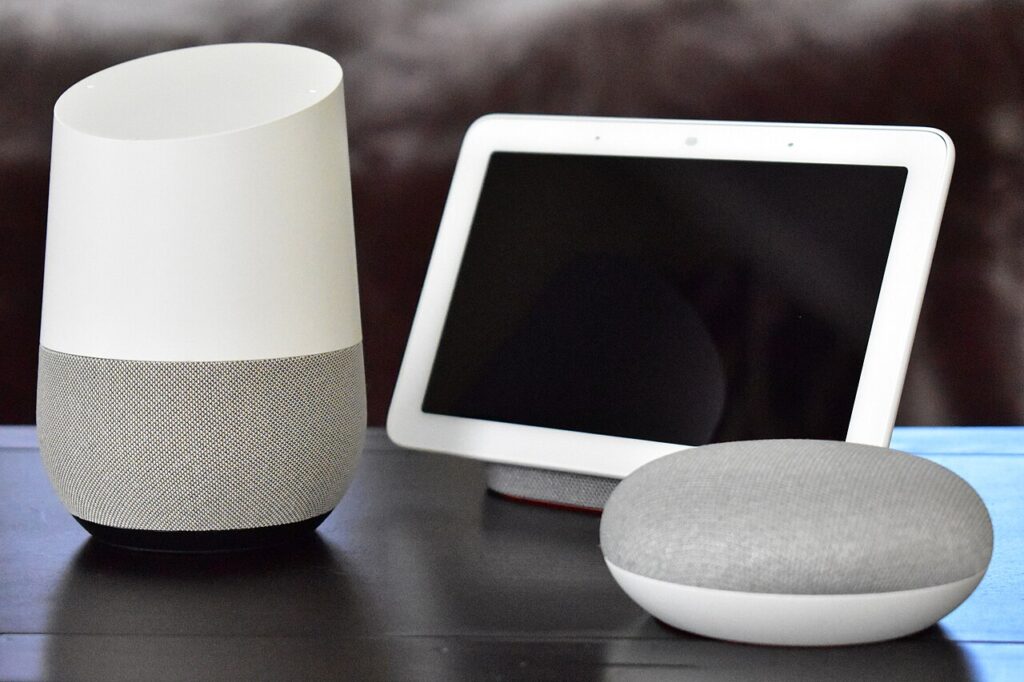
Start with three things: a voice hub (Amazon Echo Dot, Google Nest Mini, or Apple HomePod mini), two smart plugs, and two smart bulbs. That starter kit costs roughly $75–$125 (planning estimate) and gives you voice control, one automated lamp, and basic lighting scenes. Everything else — doorbells, thermostats, locks — can wait until you’ve lived with these for a few weeks. This guide is part of our Buying Guides archive and walks you through exactly what to buy, in what order.
What the top guides miss (and what this one does differently)
Most beginner guides hand you a giant shopping list. That is how people end up with twenty gadgets that don’t talk to each other. Here is the honest truth from reading dozens of these guides:
- Order matters more than brands. Buying in the right sequence — hub, then plugs, then lights, then security or climate — avoids the incompatibility mess that makes beginners quit.
- Matter changes the rules. A Matter-certified device can work with Amazon Alexa, Google Home, and Apple Home at the same time, so you are not locked into one platform forever. The standard is maintained by the Connectivity Standards Alliance.
- Your Wi-Fi is the hidden gotcha. Many smart devices connect on the 2.4 GHz band only. If your router merges 2.4 and 5 GHz under one network name, setup can stall — knowing that up front saves an hour of frustration.
Step 0: Pick your ecosystem first (5 minutes)
This is the single most important decision, and it costs nothing. Everything you buy later follows from it:
- Amazon Alexa — widest device support, cheapest on-ramps. Best if you shop on Amazon and want the most options.
- Google Home — strongest Google service integration. Best if you live in Gmail, Google Calendar, and YouTube.
- Apple Home — best privacy story, seamless if you own an iPhone. Smaller device selection, improving fast thanks to Matter.
Can’t decide? Buy Matter-certified devices. They pair with all three platforms, so a later switch doesn’t mean rebuying hardware. Amazon’s own Matter support page shows how even mainstream devices like the Echo Dot (5th Gen and newer) added Matter through a software update.
The 7 devices worth buying first, in order
| Order | Device | What it actually does | Best for | Cost (planning estimate) | Setup time |
|---|---|---|---|---|---|
| 1 | Smart speaker / voice hub (Echo Dot, Nest Mini, HomePod mini) | Voice control, timers, reminders, and the hub your automations run on | Everyone — this is day one | $30–$100 | 10 min |
| 2 | Smart plugs (a 2- or 4-pack) | Make lamps, fans, and coffee makers voice-controllable and schedulable | The best first smart device for most people | $20–$40 for a pack | 5 min each |
| 3 | Smart bulbs (2 to start) | Dimming, schedules, and wake-up lighting scenes | Bedroom or living room atmosphere | $10–$25 each | 5 min each |
| 4 | Video doorbell | See and talk to visitors from your phone | Security-first beginners | $60–$150 | 20–45 min |
| 5 | Smart thermostat | Heating/cooling schedules and remote control | Homeowners with high energy bills | $100–$250 | 30–60 min |
| 6 | Smart light switch | Controls ceiling lights the whole family uses | Homeowners (check for a neutral wire first) | $25–$60 | 30–45 min |
| 7 | Smart lock | Keyless entry with codes or fingerprint | Anyone tired of spare keys | $130–$300 | 30–60 min |
Start our deep dives with Smart Lighting for Beginners (no rewiring needed), then Best Smart Thermostats when you are ready for climate control.
What $50, $150, and $350 actually buy (planning estimates)
$50 starter (planning estimate)
One smart speaker plus one smart plug. You get full voice control and one automated device — a lamp that turns off on a schedule, or a coffee maker that starts at 7 AM. This is enough to know whether you like smart-home living.
$150 starter (planning estimate)
A speaker, four smart plugs, and two smart bulbs. Two rooms now have automated lighting and voice control, and you have plugs left over for a fan or holiday lights.
$350 starter (planning estimate)
Everything above plus a video doorbell and a smart thermostat. You now have voice control, automated lighting, front-door security, and climate scheduling — a genuinely capable starter home. See our security camera guide before adding indoor cameras.
Weekend-by-weekend setup plan
Weekend 1: The hub (about 15 minutes)
- Plug in the smart speaker (2 minutes) — put it somewhere central, like the kitchen counter or living room shelf.
- Connect it to Wi-Fi in the platform’s app (8 minutes) — the app walks you through this step by step.
- Ask it three things (5 minutes) — set a timer, ask the weather, play music. If those work, the hub is healthy.
Weekend 2: Smart plugs (about 20 minutes)
- Plug one into a lamp (5 minutes) — pair it in the app, usually by scanning a code in the manual.
- Create one schedule (10 minutes) — “lamp on at sunset, off at 11 PM.” This single automation is the moment the house starts feeling smart.
- Add voice control (5 minutes) — rename it “living room lamp” and say “turn off the living room lamp.”
Weekend 3: Smart bulbs (about 20 minutes)
- Replace two bulbs in one room (5 minutes each) — screw them in like normal bulbs.
- Build one scene (10 minutes) — a “movie night” or “wake up” scene teaches you how grouping works.
Weekend 4: Evaluate before spending more
Live with the basics for a week. Which platform feels natural? What do you wish you could automate? Then buy the doorbell, thermostat, or lock that solves a real annoyance — not a theoretical one.
What you need before you start
- A smartphone (iOS or Android) with your platform’s app installed
- Your Wi-Fi password — and knowing whether your router broadcasts a separate 2.4 GHz network (many smart devices only connect on 2.4 GHz; check your router’s admin page if pairing fails)
- One free outlet near where the speaker will live
- Patience for firmware updates: new devices often update themselves on first setup — let them finish
7 decision factors, with real dollar impact
- Ecosystem fit — $0 now, hundreds later. Switching platforms means rebuying or re-pairing everything. Spend the 5 minutes on Step 0 before spending a dollar.
- Matter certification — $0, saves lock-in. Look for the Matter logo on the box or product page. A Matter device works across all three major platforms simultaneously.
- Wi-Fi congestion — free to plan. Each Wi-Fi device eats router capacity. Around 15–20 Wi-Fi devices, older routers start choking — plan on Thread or Zigbee devices (via a hub) once you scale past that.
- Rent or own — $25–$60 per switch. Renters should skip smart switches (they need wiring changes) and double down on plugs and bulbs. Homeowners can consider switches later.
- Subscriptions — $40–$100/year each (planning estimate). Some cameras and doorbells charge monthly for cloud recording. Factor three years of fees into the “price” before buying.
- Wiring checks — $0, avoids a return. Smart switches usually need a neutral wire in the box; some thermostats need a C-wire. Check with a phone photo of the wiring before ordering.
- Voice assistant fit — $0. If the household is split between iPhone and Android users, Matter + a neutral platform avoids daily friction.
Common mistakes beginners make
- Buying everything at once. A pile of gadgets from four brands is a troubleshooting nightmare. Buy the hub first, live with it, then add one category at a time.
- Skipping the 2.4 GHz check. If pairing fails repeatedly, your phone is probably on 5 GHz while the device needs 2.4 GHz. Temporarily join the 2.4 GHz network during setup.
- Mixing platforms without Matter. An Alexa plug, a HomeKit bulb, and a Google speaker will not form one system. Pick one platform, or buy Matter devices.
- Buying the expensive hub first. A $250 display is a luxury, not a starter (planning estimate). A $30–$50 speaker does the same automation job on day one.
- Ignoring the subscription. That $60 doorbell with a $5/month recording plan costs about $240 over three years (planning estimate). Know before you buy.
- Smart switches without checking wiring. Open the switch box and confirm a neutral wire (usually white, bundled) exists before ordering — or stick with smart bulbs.
Safety and privacy
- Cameras and microphones: every voice hub has a physical microphone-off button — use it if guests are uncomfortable. Point indoor cameras at entries, never bedrooms or bathrooms, and tell household members where they are. Recording audio or video of others is regulated in some US states — check your local rules before pointing cameras at shared spaces.
- Network security: put smart devices on a guest Wi-Fi network if your router supports it, so a compromised bulb can’t reach your laptop. Enable automatic firmware updates in each device’s app.
- Electrical safety: plugs and bulbs are renter-safe. Anything involving wiring — switches, wired doorbells, thermostats — should be done by or checked by a licensed electrician if you are not confident. Turn off the breaker, not just the switch, before touching wires.
Frequently asked questions
Do I need a smart home hub?
Not for your first few devices — Wi-Fi plugs and bulbs work fine. Once you pass about 15 devices or want Thread/Zigbee sensors, a hub (or a speaker with one built in, like newer Echo models) keeps everything fast and reliable.
Will smart devices work with my Wi-Fi?
Almost certainly, with one catch: many devices connect only on the 2.4 GHz band. If your router combines 2.4 and 5 GHz under one name and pairing fails, temporarily connect your phone to a dedicated 2.4 GHz network during setup.
I’m a renter. Can I still build a smart home?
Yes — smart plugs, smart bulbs, a video doorbell that runs on battery, and a portable speaker all leave zero marks. Skip anything that requires wiring changes, like hardwired switches.
Is a smart home a privacy risk?
Any internet-connected device carries some risk. Reduce it: use the mic-off button, enable two-factor authentication on your platform account, keep firmware updated, and read each device’s privacy settings before mounting cameras anywhere.
What happens when the internet goes out?
Voice control and remote access stop, but most devices keep their last state and local schedules keep running on Thread/Zigbee networks. Wi-Fi-only devices are the most affected — another reason to plan a hub as you grow.
How much will a full smart home cost eventually?
A comfortable whole-home setup — lighting in every room, a doorbell, a thermostat, and a lock — typically lands between $600 and $1,200 (planning estimate) plus any subscriptions. The trick is spreading it over months, buying one category per month.
The bottom line
Don’t buy a smart home — grow one. Start with a voice hub, two plugs, and two bulbs for under $125 (planning estimate), pick one ecosystem, and buy Matter-certified devices so nothing you buy today becomes a paperweight tomorrow. Revisit this in a month, and add the doorbell, thermostat, or lock that solves a real annoyance. Browse the full Buying Guides archive for your next step, or contact us if you’re stuck choosing — we answer every message.